▶ Play it now: flaakira.github.io/true-or-woof
Project:
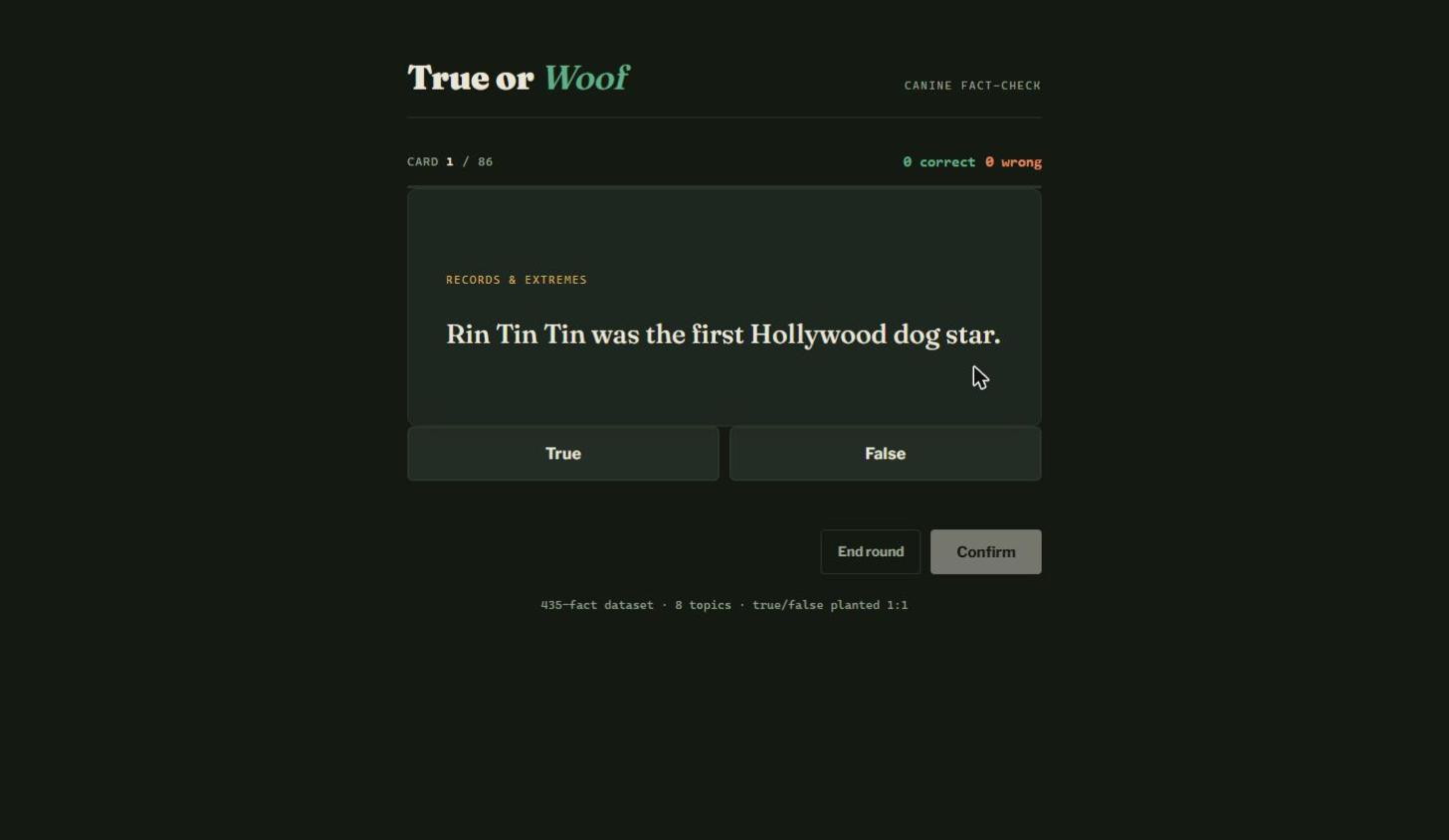
Play the game · Code RepositoryTrue or Woof is a small trivia game: a statement about dogs appears on an index card, you call it True or False, confirm, and find out whether you got played. Half the statements are real facts and half are fakes I planted on purpose. The whole thing is a single index.html — no framework, no build step, no runtime dependency. This post walks through how it works, piece by piece.
Where the facts came from
The source is the public Dog Facts API dataset. Its live endpoint has been dead since Heroku retired free dynos, so instead of calling it I read the project's static data.json (435 facts) straight from GitHub. From there I picked 43 facts that were short, clear, and about a single topic, and hand-wrote a false twin for each one — usually by swapping the key number, name, or claim.
That gives a balanced pool of 86 statements: 43 true, 43 false, spread across 8 topics (Anatomy & Senses, Behavior & Cognition, Breeds, Evolution & Domestication, Health & Safety, History & Culture, Records & Extremes, Reproduction & Puppies). The 1:1 balance matters: it means guessing "true" every time scores exactly 50%, so the score actually measures something.
Step 1 — One page, three screens
There is no router and no page navigation. The markup holds three <section> blocks, and the game just adds or removes a hidden class to decide which one is on screen.
<section id="screen-setup">    ... topic picker + Start round
<section id="screen-play">     ... the card, True/False, Confirm
<section id="screen-results">  ... score, rank, Play again
Step 2 — The data is baked into the page
The question bank lives in a JSON script tag rather than a separate file, so the game never makes a network request at runtime. Each item has the same three keys.
<script type="application/json" id="game-data">
[
  {"topic": "Anatomy & Senses", "statement": "Most dogs have 42 teeth.", "isTrue": true},
  {"topic": "Anatomy & Senses", "statement": "Most dogs have 32 teeth.", "isTrue": false}
]
</script>
The browser ignores a script tag with an unknown type, so this is just inert text until JavaScript reads it.
Step 3 — Reading the data and deriving the topics
Everything runs inside an IIFE so nothing leaks into the global scope. The topic list is never hard-coded — it is derived from the data, so adding a new topic to the JSON makes a new button appear on its own.
var ALL_ITEMS = JSON.parse(document.getElementById("game-data").textContent);
var TOPICS = [];
ALL_ITEMS.forEach(function (item) {
  if (TOPICS.indexOf(item.topic) === -1) TOPICS.push(item.topic);
});
Step 4 — One object holds the whole game
Rather than scattering variables around, every mutable thing lives in a single state object. That makes the render functions easy to reason about: they only ever read from here.
var state = {
  selectedTopics: new Set(TOPICS),
  deck: [],
  index: 0,
  correct: 0,
  wrong: 0,
  pendingChoice: null,
  confirmed: false
};
selectedTopics is a Set because the only operations needed are has / add / delete, and a Set gives all three for free without duplicate handling.
Step 5 — The topic picker
Each topic becomes a button with a live count badge. Clicking toggles it in the Set and re-renders. The one rule worth noting is the guard against emptying the pool: you cannot deselect your last remaining topic.
btn.addEventListener("click", function () {
  if (state.selectedTopics.has(topic)) {
    if (state.selectedTopics.size > 1) state.selectedTopics.delete(topic);
  } else {
    state.selectedTopics.add(topic);
  }
  renderTopicGrid();
  updatePoolCount();
});
Selection state is stored on the DOM as aria-pressed, which is both the accessibility hook and the CSS hook for the highlighted style — one attribute doing two jobs.
Step 6 — Shuffling the deck
A standard Fisher-Yates shuffle, working on a copy (arr.slice()) so the original dataset is never reordered.
function shuffle(arr) {
  var a = arr.slice();
  for (var i = a.length - 1; i > 0; i--) {
    var j = Math.floor(Math.random() * (i + 1));
    var tmp = a[i]; a[i] = a[j]; a[j] = tmp;
  }
  return a;
}
Step 7 — Starting a round
Filter by the selected topics, shuffle, zero the counters, swap screens, draw the first card.
function startRound() {
  state.deck = shuffle(itemsForSelection());
  state.index = 0;
  state.correct = 0;
  state.wrong = 0;
  screenSetup.classList.add("hidden");
  screenResults.classList.add("hidden");
  screenPlay.classList.remove("hidden");
  showCard();
}
Step 8 — Drawing a card
showCard() is the reset button for a single turn. It clears the previous answer, repaints the progress bar and tallies, drops in the new statement, and disables Confirm until a choice is made.
progressBar.style.width = (state.index / state.deck.length * 100) + "%";
cardTopic.textContent = item.topic;
cardStatement.textContent = item.statement;
btnConfirm.disabled = true;
btnConfirm.textContent = "Confirm";
Note textContent, not innerHTML — statements are treated as text, never as markup.
Step 9 — Pick, then confirm
The game deliberately splits answering into two moves. Tapping True or False only records a pending choice; nothing is scored yet. This kills the misclick problem and makes the reveal feel like a decision rather than an accident.
function pickChoice(choice) {
  if (state.confirmed) return;
  state.pendingChoice = choice;
  btnTrue.setAttribute("aria-pressed", choice === true ? "true" : "false");
  btnFalse.setAttribute("aria-pressed", choice === false ? "true" : "false");
  btnConfirm.disabled = false;
}
Step 10 — Scoring and the reveal
Confirming compares the pending choice against isTrue. Because both are real booleans, the comparison is a plain strict equality. The reveal then colours the button you picked and, if you were wrong, also lights up the one you should have picked.
var wasCorrect = state.pendingChoice === item.isTrue;
if (wasCorrect) { state.correct++; } else { state.wrong++; }

var chosenBtn = state.pendingChoice === true ? btnTrue : btnFalse;
chosenBtn.classList.add(wasCorrect ? "reveal-correct" : "reveal-wrong");
if (!wasCorrect) {
  var actualBtn = item.isTrue ? btnTrue : btnFalse;
  actualBtn.classList.add("reveal-correct");
}
A CORRECT / INCORRECT stamp is dropped on the card, a one-line explanation is written to an aria-live region so screen readers announce it, and both verdict buttons are locked so the answer cannot be changed after the fact.
Step 11 — One button doing two jobs
The primary button is Confirm before you answer and Next card afterwards. Relabelling it saves a button and keeps the thumb in one place on mobile.
btnConfirm.textContent = state.index + 1 < state.deck.length ? "Next card" : "See results";

function advance() {
  if (!state.confirmed) { confirmChoice(); return; }
  state.index++;
  if (state.index >= state.deck.length) {
    showResults();
  } else {
    showCard();
  }
}
Step 12 — Results and ranks
At the end the score is turned into a percentage and mapped onto a small ladder of dog-themed ranks, each with its own closing line.
var pct = total ? Math.round((state.correct / total) * 100) : 0;

if (pct === 100)      { rank = "Top Dog"; }
else if (pct >= 80)   { rank = "Good Boy"; }
else if (pct >= 60)   { rank = "Loyal Companion"; }
else if (pct >= 40)   { rank = "Still in Training"; }
else                  { rank = "Chasing Its Tail"; }
Since the deck is 50/50 by construction, "Still in Training" at 40–59% is roughly the coin-flip band — a nice built-in sanity check.
Step 13 — Wiring it up
The last few lines attach the listeners and paint the setup screen. That is the entire bootstrap.
btnTrue.addEventListener("click", function () { pickChoice(true); });
btnFalse.addEventListener("click", function () { pickChoice(false); });
btnConfirm.addEventListener("click", advance);
btnQuit.addEventListener("click", showResults);
btnStart.addEventListener("click", startRound);

renderTopicGrid();
updatePoolCount();
A few design choices
The two display fonts are embedded directly in the CSS as base64 WOFF2, so the page makes zero external requests and looks identical offline. Theming is done with CSS custom properties, which is what makes the light and dark variants a handful of variable swaps instead of a second stylesheet.
Accessibility came almost for free by using the right primitives: real <button> elements (so keyboard and Enter/Space work with no extra code), aria-pressed for toggles, and aria-live="polite" on the feedback line.
Deployment
Because the game is one self-contained file, hosting is trivial: push index.html to the repo root and turn on GitHub Pages with Deploy from a branch → main → / (root). About a minute later it is live at flaakira.github.io/true-or-woof.
What I took from it
The interesting part was not the JavaScript, it was the data work: a public API that no longer answers, a static dataset that still does, and the realisation that a trivia game needs wrong answers as much as right ones. Writing 43 believable fakes turned out to be harder — and more fun — than writing the game loop.
What this taught me as a data analyst
The game is the fun part, but the work behind it is the same work I do as an analyst. Five things stuck with me.
1. A dead API is not a dead dataset. The Dog Facts endpoint stopped answering when Heroku retired its free dynos, but the project's static data.json was still sitting in the repository. An endpoint is only one door into a dataset — raw JSON files, static dumps, mirrors and CSV exports are usually still open. Before writing off a source, go looking for the other doors.
2. Ingest, transform, export. The prep was plain Python 3: urllib to pull the raw payload, json to parse the nested response into flat records, string cleaning to normalise the text, and csv to write the curated output. Exactly the same three moves as any ETL job at work, just at a smaller scale and with dogs in it.
3. Filtering is a judgement call, and the criteria have to be written down. Out of 435 raw facts I kept 43: short, unambiguous, one topic each. Curation is where quality beats volume — but only if the rule you applied is explicit enough to apply again next month and get the same answer.
4. Class balance is a metric-design decision. 43 true and 43 false is deliberate: it pins the baseline at exactly 50%, so any score above it actually means something. Anyone who has evaluated a model on an imbalanced dataset knows the alternative — an accuracy number that looks impressive and says nothing at all.
5. Schema first, interface second. Every record carries the same three keys, and the topic buttons are derived from the data rather than hard-coded. Get the schema right and the layer sitting on top maintains itself — that is true for a trivia game, and just as true for a dashboard.
- HTML5 & CSS3 (custom properties, no framework)
- Vanilla JavaScript (no build step, no dependencies)
- Python 3 for the data-prep pipeline (urllib, json, csv)
- Dog Facts API static dataset (435 facts)
- GitHub Pages
Tools & Process: